
Walk into the IT room of most growing Philippine companies and you'll see the same thing: unopened boxes stacked to the ceiling, spare monitors along the wall and returned laptops nobody has checked. The IT office has quietly become a storeroom.
Holding some spare equipment makes sense. Holding it in the wrong place, without a clear number in mind, doesn't. This guide explains buffer stock for IT equipment, how to work out how much you need and where to keep it.
What is buffer stock?
Buffer stock, also called safety stock, is the extra inventory you hold to cover unexpected demand or supply delays. Supply chain bodies such as ASCM use the term across every industry. For IT, it's the small pool of ready-to-go laptops, headsets and monitors that lets you equip a new starter, or replace a failed device, without waiting on a supplier.
Too little buffer stock and new hires start without equipment. Too much and you have cash tied up in devices that sit in boxes, losing value and warranty time.
How to calculate buffer stock for laptops
A common formula is:
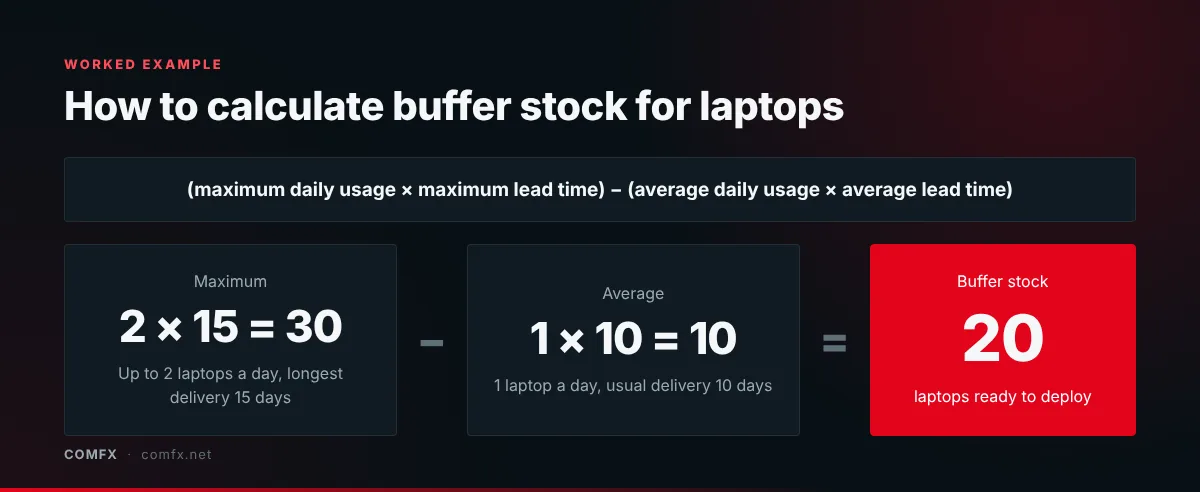
Buffer stock = (maximum daily usage x maximum lead time in days) minus (average daily usage x average lead time in days)
Here's a simple example. Say your company issues an average of one laptop a working day, but on busy days it can be two. Your supplier usually delivers in 10 days, but it has taken as long as 15.
- Maximum: 2 laptops x 15 days = 30
- Average: 1 laptop x 10 days = 10
- Buffer stock: 30 minus 10 = 20 laptops
Use your own hiring plans and supplier lead times, and review the number each quarter as headcount and hiring pace change. Contact centres that ramp up seats for new campaigns usually need a larger buffer; see how we support BPO and contact centre teams.
Why the office isn't the right place for it
Premium office space in BGC, Makati or Ortigas is expensive to use as a storeroom. Office cupboards also aren't designed for long-term storage of electronics in a humid climate, and loosely stored stock is easy to lose track of, especially when devices move between teams.
Choosing a warehouse in the Philippines for IT stock
If you're looking at warehouse options in the Philippines for IT equipment, general storage space is only part of the answer. Look for:
- Climate-controlled, secure storage suited to electronics
- Serial-number tracking, so you always know what's in stock and who has what
- Insurance on stored and in-transit equipment
- Staging services, so devices can be prepared and bundled before dispatch
- Direct dispatch to employees and branches nationwide
How Comfx managed storage and staging works
- Buy your buffer stock upfront: Purchase your expected requirement in advance to secure volume pricing and lock in current rates.
- Secure, climate-controlled storage: Your equipment is catalogued by serial number, insured and stored in our central facility, with stock levels visible on your inventory sheet.
- Fast dispatch when you need it: When HR confirms a new starter, send us their delivery address. Comfx pulls the device from your buffer stock, adds the right accessories and dispatches it directly to the employee anywhere in the Philippines within 24 to 48 hours.
Dispatching straight to homes works best when each kit is standardised; our WFH setup guide explains how.